How wellcoverguide.com Handles Updates and Corrections
Last updated: November 15, 2026
Quick answer: 3 signals show how wellcoverguide.com handles updates and corrections — live page edits, revision notes, and maintenance of the article after publication. This article explains How wellcoverguide.com handles updates and corrections in practical terms, so you can see how the site treats mistakes after publication and when it considers a page corrected. If you want a professional reading of a specific correction decision, consult a qualified editor or publisher; there is no single universal standard, and Reuters notes that corrections should be transparent and prompt. See also Reuters Handbook, Google Search Central, and the site’s content standards page.
Key takeaways
- Corrections on the site are about fixing the live page, not hiding the mistake.
- Updated pages can reflect small edits, clearer wording, or fuller accuracy fixes.
- Revision notes matter because they show that a page changed after publication.
- A correction policy is most useful when you want to judge whether a page stays current over time.
- This page explains corrections, not sourcing rules or the site’s general about page.
What is the wellcoverguide.com correction policy?
The wellcoverguide.com correction policy is the site’s approach to fixing mistakes after a page has already gone live. That usually means changing the text, updating the page, and leaving some sign that a revision happened when the change matters to the reader.
A good correction policy does three jobs at once. It fixes the error, keeps the page useful, and reduces the chance that the same wrong detail stays in circulation for weeks or months. On a content site, that matters because a page can be read long after publication day.
For a reader, the main question is not whether a typo exists somewhere. It is whether the site treats error corrections as part of normal site content upkeep. If you want a reliable read on that practice, it is wise to consult a professional editor or publisher. A page can be changed in a few minutes, but the correction process should still be clear enough that a reader understands what changed and why.
This is also where correction notes fit. A note can separate a minor wording fix from a more meaningful accuracy update. That distinction helps when a page has been revised more than once, because readers can see whether the change was cosmetic or tied to a real factual correction.
The policy is not the same thing as the site’s sourcing method, and this page does not cover that. It is about what happens after publication: error corrections, updated pages, revision notes, and the maintenance of site content over time. If you want the broader standards hub, the content standards page sits above this one and explains the system at a higher level.
How does wellcoverguide.com correct mistakes?
Therefore, wellcoverguide.com corrects mistakes by changing the page itself and then marking the revision in a way that makes the update visible or traceable. That is the basic workflow a reader should expect from a content site that cares about accuracy updates.
A practical correction process usually follows a few steps:
- Identify the error in the live page. That can be a wrong detail, a missing clarification, or a statement that no longer fits the current page.
- Edit the site content. The text is changed directly on the updated page so the reader sees the corrected version, not the old one.
- Add or revise the correction note if the change matters. This gives the page a record of the update instead of leaving the change invisible.
- Check nearby text for knock-on errors. A single bad line can affect a paragraph, a heading, or a comparison table, so the page needs a quick pass after the edit.
- Keep the page aligned with later revisions. If the same article is updated again, the site should not create a second version that conflicts with the first correction.
That process sounds simple because it should be. The hard part is not pressing “edit.” The hard part is deciding whether the change is big enough to deserve a note, and then making sure the updated page still reads cleanly after the correction.
Readers often worry that a correction means the whole article is unreliable. Even so, that is not always true in every case. In many cases, a correction shows the opposite: the page is being maintained instead of being left to age in place for 12 months or longer. A site that never changes anything can look tidy, but it can also leave old mistakes in view.
A good correction policy also avoids overreacting. Not every small wording polish needs a formal note. If a sentence is tightened for clarity, that is page maintenance. If a fact changes, that is a correction. If the article is reshaped because the topic itself changed, that is a revision.
Where do revision notes appear?
Specifically, revision notes appear on or near the updated page when the change is significant enough that a reader should know the site edited the content. That is the cleanest way to handle a correction without forcing the reader to guess what changed.
On a well-run content page, revision notes should be easy to find without taking over the article. A note tucked into the body of the text, a line near the top, or a small update marker can all work, as long as the note is tied to the page itself. A correction note that lives nowhere visible does not help the reader.
This matters because a page can go through more than one kind of change. A typo fix, a rewritten paragraph, and a full accuracy update are not the same thing. Without a visible note, all three can blur together, and the reader has no way to tell whether the page was polished or corrected.
The best revision note usually does not need a long explanation. It needs enough detail to tell the reader that the page was updated and, when relevant, what kind of update it was. A short note can be enough for a small edit. A more serious correction may need a clearer statement that the page was revised for accuracy.
That balance matters for trust. If every page says it was updated, the note loses value. If no pages show revision notes, the site may look static even when it is being maintained. The point is to make the update visible in the right places, not to clutter every article with a long history log.
For readers comparing content standards across a site, revision notes are often the easiest signal to check in 10 seconds. They tell you whether the page has been looked at again after publication, which is often the first sign that the site treats accuracy as ongoing work rather than a one-time task.
What changes count as an update?
So an update is any meaningful change to site content, and not every update is a correction. That distinction matters because a page can be changed for style, structure, or accuracy without all of those edits meaning the same thing.
A simple way to separate them is this:
| Type of change | What it usually means | Why it matters |
|---|---|---|
| Typo fix | A spelling, punctuation, or grammar change | Improves readability, but does not always change meaning |
| Clarification | A sentence is rewritten for easier reading | Helps the reader understand the point faster |
| Accuracy correction | A wrong fact is replaced with the right one | Protects the page from repeating bad information |
| Revision | The article is reshaped or expanded | Signals broader content maintenance |
| Freshening update | Old references, language, or examples are replaced | Keeps the page current without changing the core point |
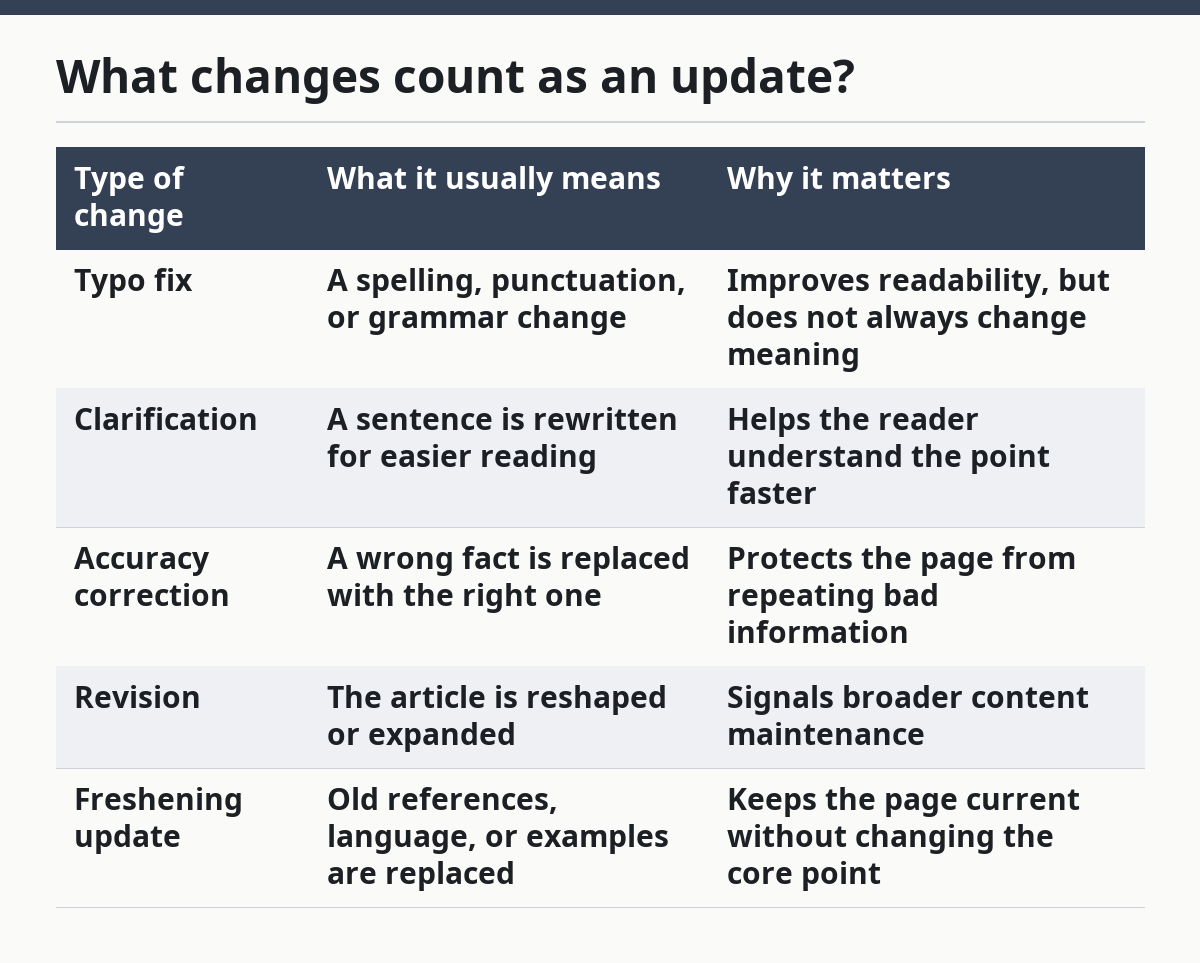
This table is useful because readers often assume every edit is a correction. That is not true. A page can be updated for style without any factual mistake, and a page can also be corrected without changing its overall structure.
A careful site keeps those categories from bleeding together. If an article says “updated” but hides a factual error, the label is too vague. If it marks every comma change as a correction, the label becomes noise. The best practice is to match the note to the size of the change.
This is one reason content maintenance needs judgment. A page about a fixed topic may only need light revision once in a while. A page covering details that can shift over time may need more active accuracy updates. The policy should make room for both without pretending they are the same job.
What should readers look for on updated pages?
Because updated pages can look similar at a glance, readers should look for whether the page shows the change, not just whether it claims to be current. A page can say it has been updated and still leave the reader guessing about what changed in the last revision.
The first thing to check is the date or note attached to the page, if one is present. A clear update marker gives the reader a basic timeline. The second thing to check is whether the main text reflects that update in a real way. If the note says the page was revised but the article still reads like an old draft, the maintenance work was not thorough enough.
Another useful check is consistency. If one paragraph uses a newer term and the rest of the page still uses older wording, the revision may have been partial. That does not always mean the page is wrong, but it does mean the update work may not have reached the whole article.
Readers should also watch for the difference between small cleanups and real corrections. A page with a few edited sentences may simply be easier to read now. A page with a revision note tied to accuracy updates is making a stronger promise. The note should match the work done.
This is where trust is built. A site that treats updated pages as living content gives readers a better shot at current information. A site that leaves old errors on the page, or changes content without any trace, makes it harder to know what version you are reading.
When is a correction not enough?
However, a correction is not enough when the page needs a wider rewrite rather than a local fix. If the problem sits in the structure of the article, a single line edit can leave the rest of the page inconsistent.
That can happen in three ways. The article may have one wrong fact in a larger argument, and fixing only that sentence leaves the surrounding text weak. The page may use outdated wording across multiple sections, which needs a broader revision instead of a tiny patch. The article may have grown so much through past edits that the update notes no longer match the content on the page.
In those cases, the right move is not just a correction note. It is a proper revision. That means the page is reviewed as a whole, the old error is removed, and the updated page is checked for new conflicts. A revision like that may take more work than a quick correction, but it avoids a patchwork article that looks revised and still reads off.
This is also the point where readers should be realistic. No content site can promise that every page will stay perfect on its own. A correction policy is useful because it shows how the site responds when mistakes appear. It is not a guarantee that no mistake will ever get through.
That honesty is part of the value. A policy that admits pages may need correction, revision, or later maintenance is usually more credible than one that pretends old content never drifts. If a reader wants a page that has been refreshed after publication, the presence of revision notes and updated pages is the signal to look for.
How should a reader judge the policy?
Therefore, a reader should judge the policy by how clearly it separates corrections, revisions, and routine maintenance. That separation is the real test, because it shows whether the site treats accuracy updates as a process instead of an afterthought.
A strong policy gives simple answers to three questions. What counts as an error correction? Where does the site show the change? And what happens when a page needs more than a one-line fix? If the answers are fuzzy, the policy is weak even if the page looks polished.
The policy also should not be read as a promise that every article will carry a long history of edits. A site can keep revision notes brief and still be honest. What matters is that the notes exist when they need to, and that the updated page reflects the correction in the text itself.
This page belongs under the broader wellcoverguide.com content standards hub because corrections are only one part of page quality. The hub explains the larger system; this page explains what happens after publication when a page needs a change. That split matters, because readers looking for correction policy should not have to sift through unrelated writing rules.
If you are checking the site for trust signals, the correction policy is one of the better ones to inspect. A page that can be corrected cleanly, revised without confusion, and maintained without hiding changes is easier to rely on than a page that never shows its work.
How does wellcoverguide.com correct mistakes?
After that distinction, wellcoverguide.com corrects mistakes by editing the live page and, when needed, adding a correction note. That lets the site fix the error without leaving the reader on an old version of the article.
The exact note may be brief, but the correction should still be tied to the page itself. If the text changes in a way that affects meaning, the updated page should make that visible.
Where are corrections shown on wellcoverguide.com?
Because corrections are tied to the page itself, they are shown on the page where the change was made, usually through an update marker, revision note, or visible text change. The point is to keep the correction close to the content it affects.
A hidden correction is easy to miss and hard to trust. A visible one gives the reader a clear signal that the article has been maintained.
What happens when wellcoverguide.com updates a page?
Once wellcoverguide.com updates a page, the site revises the site content so the live article reflects the newer version. That may mean a small wording fix, a clearer explanation, or a factual correction.
If the update is meaningful, the page may also carry a revision note. That helps the reader see that the content changed after publication and was not simply left as-is.
Drafted with AI; not yet reviewed by a person.



5 thoughts on “How wellcoverguide.com Handles Updates and Corrections”